


15.6 Inch Digital Calendar, Full HD Touchscreen Smart Planner for Family Schedules – Wall & Desk Mount, Great for Seamless Daily Planning & Household Organization, with LED Reminder Light
Original price was: $359.98.$189.98Current price is: $189.98.



From the brand


Want more features?
We’ll keep adding more!

First-Time Setup Guide

See Schedule in a New Light

See Everything at a Glance

Auto-Rotate

1. 【A Smart Family Calendar Everyone Can See】 A large 15.6″ FHD touchscreen that keeps family schedules clear and visible. View plans by day, week, or month—no more asking “what’s today?”
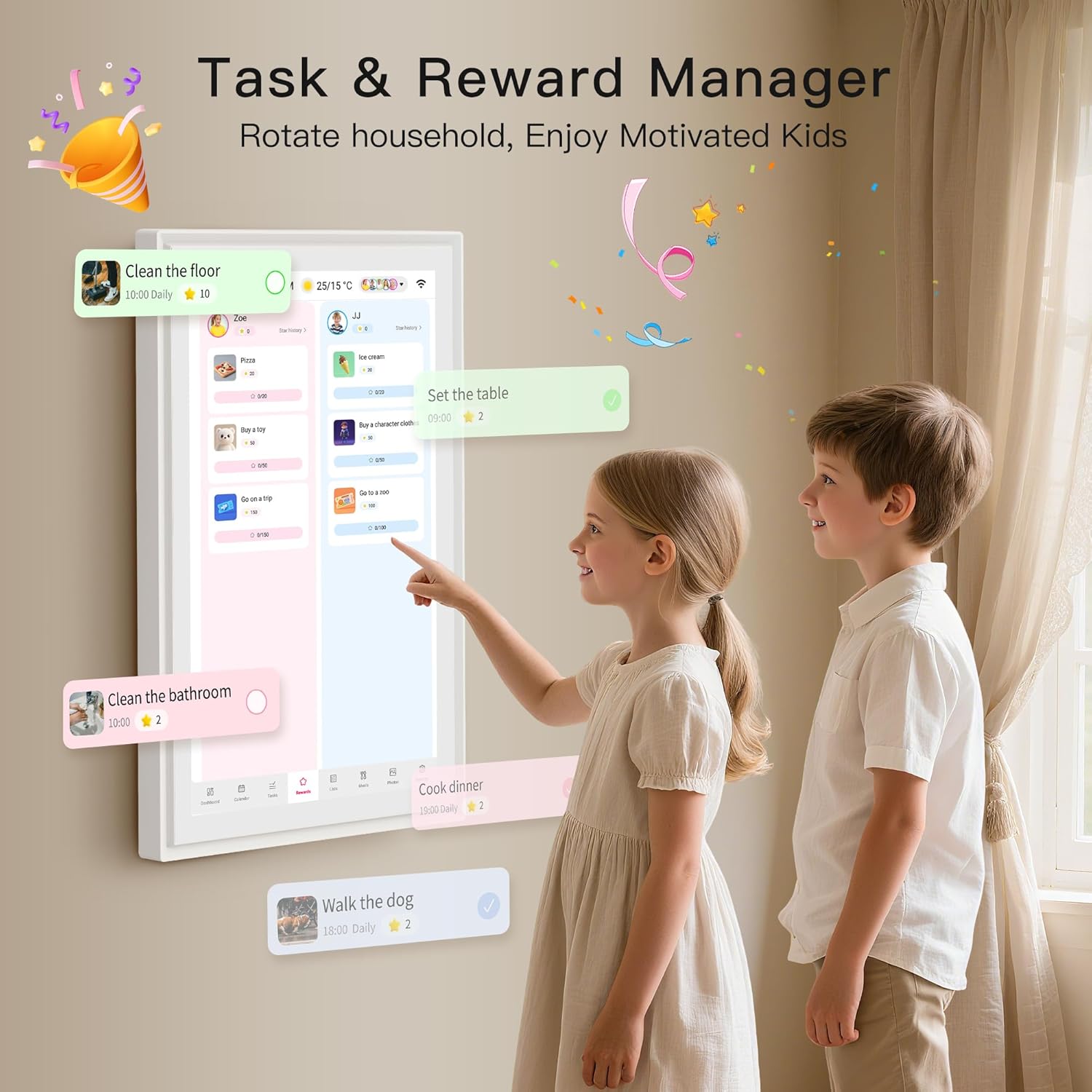
2. 【Chores Made Fun, Not a Battle】 Built-in chores and rewards system helps kids build responsibility while parents track progress at a glance. Less nagging, more teamwork at home.
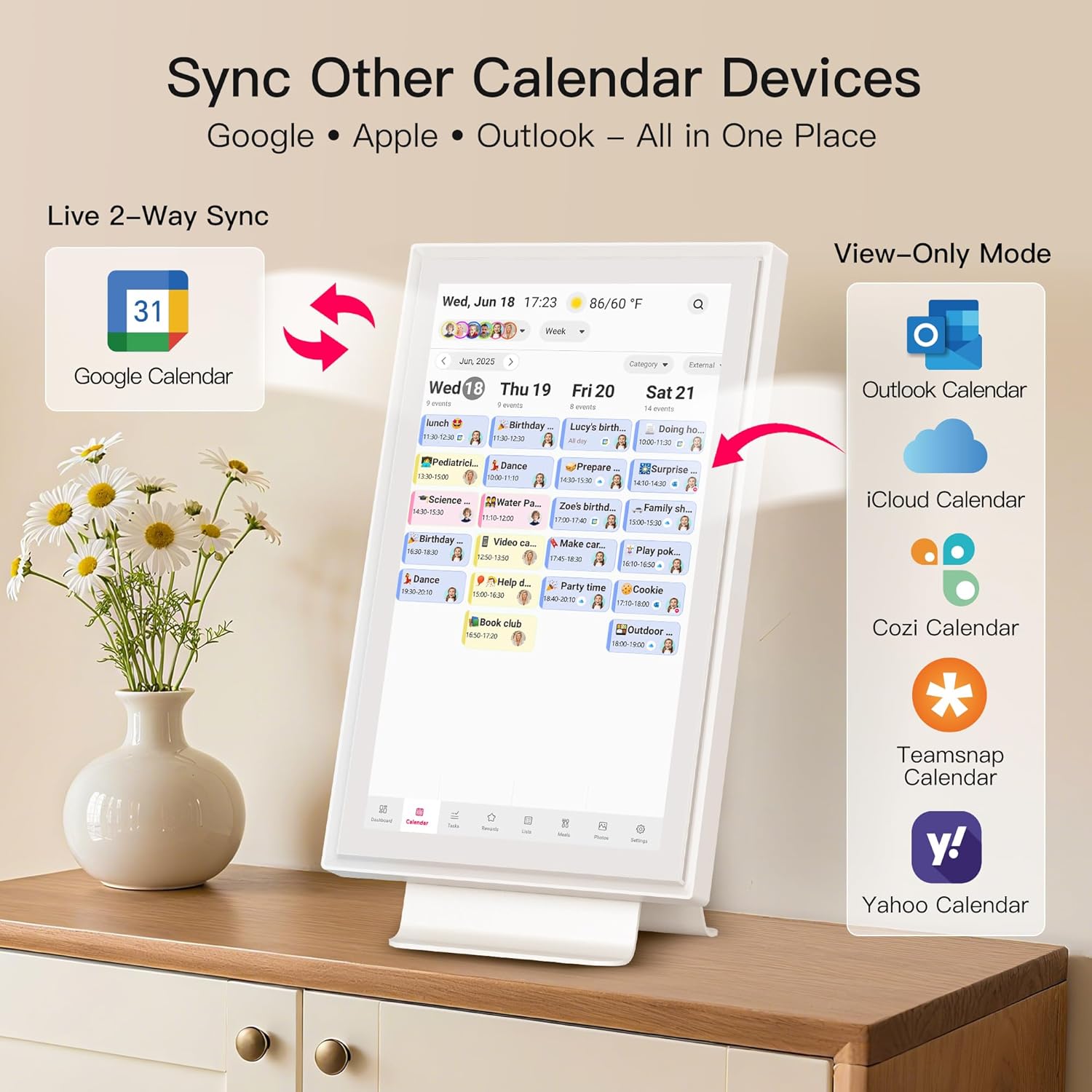
3. 【Syncs with Your Online Calendars】 Two-way sync with Google Calendar keeps everything updated in real time. View iCloud, Outlook, and other calendars together on one shared family screen.
4. 【Meal Planning + Digital Photo Frame】 Plan weekly meals ahead and simplify grocery shopping. When not in use, it becomes a digital photo or video frame, filling your home with memories.
5. 【One Color per Person, Not per Event】 Each family member gets their own LED color and sound reminder. At a glance, you know who it’s for—not just when it happens. No confusion, no mix-ups.
6. 【Smart Features, Flexible Placement】 Weather display, auto-brightness, screen rotation, and sleep mode make daily use effortless. Place it on a wall or desk—perfect for kitchens and living spaces.
7. 【Easy Setup, No Subscription Required】 Plug in, connect WiFi, and use the Whale Framely app to create your own plans on your phone—even when you’re away from home. Everything syncs smoothly to your family calendar. No monthly fees, free updates, and reliable customer support.
12 reviews for 15.6 Inch Digital Calendar, Full HD Touchscreen Smart Planner for Family Schedules – Wall & Desk Mount, Great for Seamless Daily Planning & Household Organization, with LED Reminder Light


Lindsay –
Digital calendar
Update! I LOVE this calendar. I eventually got the calendar colors figured out and it is working great. I just noticed it got a software update and it’s great! I can now make a task list that repeats daily and can give star rewards to the kids for good behavior! This is big. It also added a meal plan and photos of wanted. I really like the upgrade! My kids are very good about checking the calendar daily and the alarm still the sound and light are very helpful. Especially with me having surgery it goes off so the family knows where they have to be without asking me! I love it.—Super convenient to have our list for the day laid out for us. I was using expo marker calendar but I like that this is digital and auto syncs with my Google calendar.I just wish I could change the color of my multiple calendars I have. I can if I add other user, but I have a few calendars under one account. There is about a dozen colors though for each user.It is smooth functioning and touch screen. Very easy to use and operate through the calendar. It has weather and list it’s a good size, not overwhelming big but still big enough to see everything I need.The app was easy to download and connect to. Just scanned a qr code. Setting up the stand is easy enough but there is an option to hang on the wall if you prefer that.If you have notification settings set up it will pop up with a light around it with the color of the person whose event is coming up and I think that’s pretty cool.I have now found a workaround getting the light set up. It’s just been complicated to get all the emails connected but it’s fine. At least now I can see each color
Aiden Weitzel –
Perfect for family planning
Setup was super easy and the screen looks really clear with great color. The touch screen works smooth, and the LED reminder light is a nice touch that helps us not miss anything.We use it for meal plans, appointments, and daily tasks, and it keeps everyone on the same page. It looks good on the wall and doesn’t take up much space.Really happy with it — makes staying organized way easier for the whole family.
Orcatrainer –
An Absolute Game-Changer for Our Busy Household!
For years, our household’s schedule has been a chaotic mix of a kitchen whiteboard, random text messages, and a fridge covered in sticky notes. We’ve tried shared apps on our phones between roommates, but something always got missed. I bought this 21.5-inch digital calendar on a whim, hoping it would bring some order to the chaos, and I can honestly say it has completely transformed how we manage our lives.The first thing that strikes you is the size. The 21.5-inch screen is huge, bright, and easy to read from across the room. It’s become the central command center of our kitchen. The setup was shockingly simple, I just plugged it in and followed the prompts. No tech wizardry required.What truly makes this calendar special is the family-centric design. Each of us has our own color (I’m blue, my other roommate chose red and Green), and the little LED light that glows with the color of the next upcoming event is a brilliant touch. It’s so easy to glance at the calendar and instantly know who has something coming up. The kids have even taken ownership of their schedules, adding their own homework reminders and playdates.The functionality goes way beyond just appointments. We have shared lists for groceries, meal planning for the week, and we’re already building one for Christmas gift ideas for friends and family. It’s fantastic to add “milk” to the list from the kitchen and know that I will also see it on my phone app while I am at the store.Speaking of the app, the “Whale Framely” app and calendar syncing is flawless. The two-way sync with our respective Google calendar is perfect. Changes I make on my phone are instantly on the kitchen display, and vice versa. I also love the privacy feature: the main display shows everyone’s plans so we are all on the same page, but on my personal phone app, I only see my own events, which keeps things uncluttered.This calendar is more than a gadget; it’s the personal assistant our messy household desperately needed. It has eliminated the constant “Are we busy on Saturday?” questions and has made sure we haven’t missed a single appointment or birthday. If you’re looking to bring some calm and organization to your household or family’s hectic schedule, I cannot recommend this enough. It’s worth every penny, especially with no subscription fees!Pros:* Large, clear, and vibrant touchscreen display.* Incredibly easy to set up and use.* Color-coding and LED lights are fantastic for at-a-glance info.* Seamless two-way sync with Google Calendar.* The shared lists feature is incredibly useful for household management.* No subscription fees!Cons:* Honestly, I can’t think of any yet! It has exceeded all my expectations.
Susan Timmerman –
Lacks Alexa Skill to Work with Echo Devices
The calendar has many great features. It was easy to setup and hang on the wall. After I did that I realized that it would be more useful if it had an Alexa Skill to interface with my Amazon Echo devices. I returned the calendar.
Cynthia –
Functions great and kids friendly
This digital calendar is a must have especially for a busy household. It is easy to setup and kids friendly. It functions really well and you can track all your setup. Very sturdy and the bigger than I expected. It came with different stand and a wall mount, so youou can either place it on the table, countertop or you can mount it on the wall. It is worth buying so I recommend it.
ptpackage –
Finally a Calendar That Keeps Everyone Organized
This digital calendar has made organizing our family so much easier. The shared lists are incredibly convenient — groceries, chores, to do’s, all in one place and visible to everyone. No more scattered notes or forgetting who’s responsible for what.The calendar syncing is the best part. It automatically connects with Google Calendar, iCloud, Outlook, and more, so all our family activities show up instantly. Soccer games, appointments, work schedules — everything updates in real time and keeps us on the same page.Setup was quick, the color-coding makes it easy to see who has what going on, and the whole system has genuinely reduced our daily chaos.Highly recommend for any busy household that wants smoother scheduling and better organization.
Teneia Lindsey –
Kool and handy gadget to have
I decided to try out this 15.6 Inch Digital Calendar, Full HD Touchscreen Smart Planner for Family Schedules and I’m glad I did. It’s very handy and a kool gadget. It came with several adapters for the wall plug for different countries, which is thoughtful. It can be powered on with the included plug, or a type C charger. The screen quality is pretty good, and because of the size, very easy to see and read. The screensaver can be one photo, or a photo slideshow.
KT –
J’avais une tonne de photos de famille, de vacances, dans mon pc et mon téléphone. Elles sont rarement visionnées et c’est dommage. Grâce à ce cadre les photos passent et repassent, et je trouve l’idée géniale. La rotation portrait ou paysage se fait automatiquement. La qualité d’image est excellente et c’est un écran tactile, il est donc très facile de naviguer et d’ajuster les paramètres. il dispose d’une fonction d’horloge et de météo qui peut également être activée/désactivée selon vos préférences. Vous pouvez également régler l’heure de la journée à laquelle vous souhaitez que le cadre soit actif. Avec l’application Frameo sur votre téléphone portable, vous pouvez télécharger des photos sur votre cadre et inviter d’autres personnes à télécharger également des photos. Un super cadeau à offrir, cela plait aux petits comme aux grands.
Tomie Phan –
First impressions: Setup was a breeze thanks to clear instructions. I love that it includes both a stand and wall-mount options.The screen is vibrant, and touch responsiveness is on point.Connecting to our home Wi-Fi was simple, and I had no trouble syncing my Google Calendar. It’s exactly what we were looking for—a minimalist, practical family command center without distracting extras.Detailed follow-up: After using this daily for three weeks, I can honestly say it’s worth every penny. The real-time sync between the calendar and our phones works flawlessly. We use the shared lists constantly, and the ability to set alarms for important events has kept us on track. While it doesn’t offer subscription-based features, that’s actually a plus for us—it’s focused, fast, and frustration-free.The build quality is solid, and customer support was helpful the one time I reached out. Strongly recommend if you want function over fluff.
li –
Je viens d’acquérir ce cadre photo numérique WiFi et je suis enchanté par ses fonctionnalités innovantes. L’écran tactile IPS de 10,1 pouces offre une qualité d’image exceptionnelle avec une résolution de 1280 * 800, ce qui rend chaque photo et vidéo éclatante et nette. La mémoire interne de 32 Go permet de stocker une grande quantité de souvenirs précieux sans avoir besoin de cartes mémoire supplémentaires. Ce qui rend ce cadre photo vraiment spécial, c’est sa fonctionnalité de partage sécurisé via l’application Frameo. Cela me permet de partager instantanément des photos et des vidéos avec ma famille et mes amis, où qu’ils soient, ce qui est vraiment fantastique pour rester connecté. De plus, l’application offre une interface conviviale et intuitive, facilitant le partage et l’organisation du contenu. En résumé, ce cadre photo numérique est un choix parfait pour ceux qui cherchent à afficher et à partager leurs souvenirs de manière élégante et moderne.
Jean-Claude Grouard –
Écran connecté d’environ 26cm de diagonale pour usage de cadre photo, la qualité de l’image est vraiment bien, c’est du HD, l’écran est tactile, affiche l’heure et la météo dans le coin de l’écran.Ce cadre photo se connecte au Wifi de la maison, et via une appli sur le tel, n’importe qui peut ajouter une photo sur le cadre si il a au préalable télécharger l’App frameo et lié son compte au cadre, c’est l’idéal pour que toute une famille partage des photos à tout instant !L’appli est très bien faite, ergonomique et intuitive, rien à reprocher.La capacité de l’écran est de 30 go, de quoi faire une belle collection de photos.Juste un très léger point noir, le fait que pour supprimer une photo, il faut aller dans les paramètres, le choix direct dans la galerie aurait été parfait et via l’App on ne peut supprimer que les photos que l’on a envoyé.Au final c’est vraiment un bon produit, bien fini, qui fait un super cadeau
Momo –
Initial thoughts: Right out of the box, the calendar feels premium and sturdy. I was able to mount it easily on the wall using the included hardware. Connecting to my iPhone calendar required a quick adjustment (had to set the iCound to public and paste the URL), but since then, everything syncs automatically. The app is simple and intuitive. Looking forward to putting this through its paces over the next few weeks!